
Let’s Do An A1C Test!
Inside, you should find the following:
- Two plastic shaker pouches (labeled with a 1). Each shaker pouch contains one lancet, one blood collector, and one shaker.
- Two foil cartridge pouches (labeled with a 2).
- The analyzer, which will give the blood test value.
- A paper copy of instructions for using the test kit.
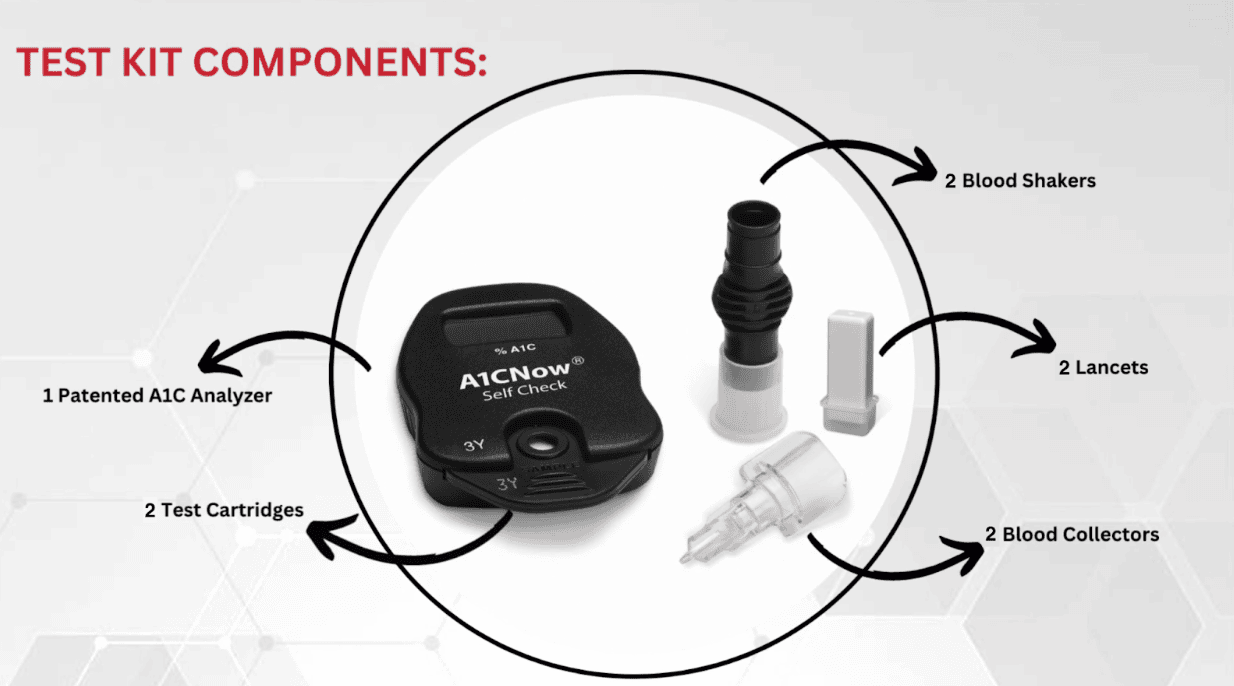
You’ll only use one shaker pouch and one cartridge pouch at a time. Make sure you keep the extra pouches and the A1C analyzer for your next blood test in the study!
Ready for your self-blood test?
In the box, there is one page of instructions that you can also view online.
Follow these steps:
- Check the expiration dates on the back of the pouch 1 (the shaker pouch) and the analyzer to ensure that your test has not expired. If your test has expired, stop here and contact the Noom research team to receive a new test kit!
- Make sure that the lot numbers on the back of the analyzer and on the back of both pouches that you will use today match. Note that the lot number on the back of the foil pouch (pouch 2) is stamped rather than printed in ink..
- Open pouch 1 (the shaker pouch).
- Wash your hands or clean them with alcohol, and dry them completely.
- Remove the cap of the lancet and press the red end into your finger. Gently squeeze your finger for a blood drop to form.
- Gently touch the tip of the blood collector to the top of the blood drop to fill. Use the reference photo below to make sure the blood collector is adequately filled!
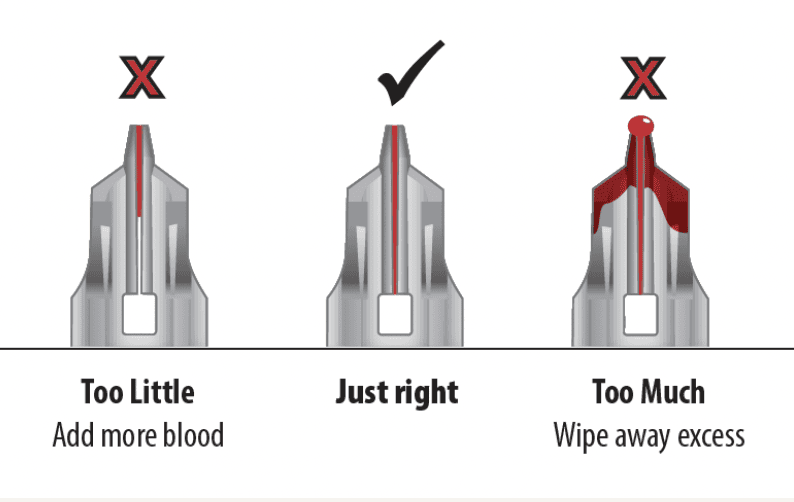
- Fully insert the blood collector into the shaker body, pushing hard while twisting. Use the reference below to make sure the blood collector is fully inserted.
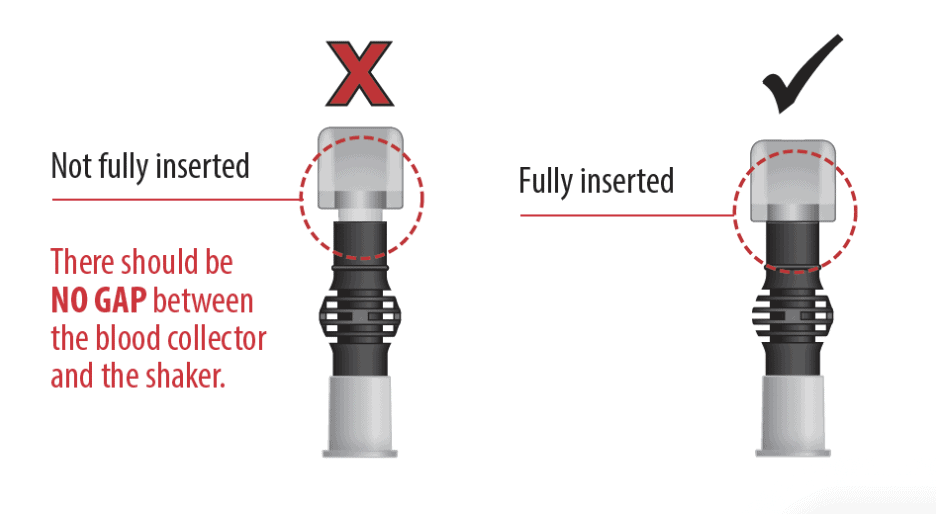
- Shake vigorously 6 to 8 times (for about 5 seconds) to mix the blood with the solution. Stand the shaker on a flat surface.
- Open pouch 2 (the cartridge pouch).
- Make sure the analyzer and test cartridge codes match, as shown in the photo below. If the codes do not match, reach out to customer service.
- Insert the cartridge into the analyzer by clicking it into place,
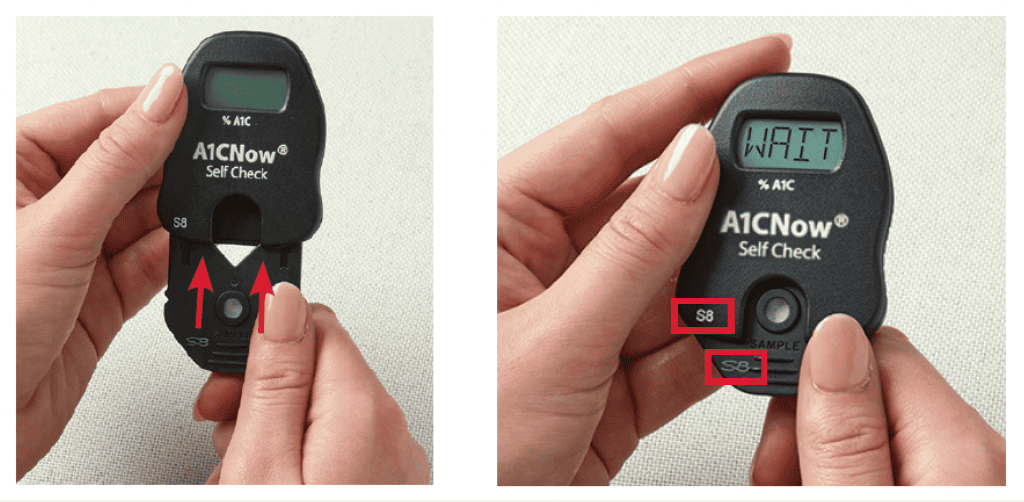
- Once the analyzer says “SMPL”, remove the shaker base and push down on the cartridge to dispense the diluted sample into the circle (see below). “RUN” should then appear on the analyzer, which means that the test is being run.
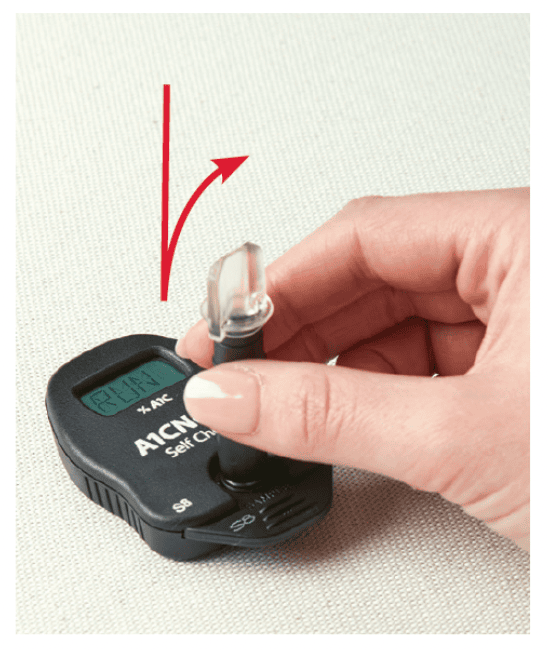
- Leave the analyzer while it counts down for 5 minutes to generate the results.
- Within 15 minutes, take a photo of the analyzer with your test value and note down the number it reads. You will need them for the last part of the process! Be sure that the A1C value is clearly showing (should be a number between 4.0 and 12.0) in the photo. See an example photo below:
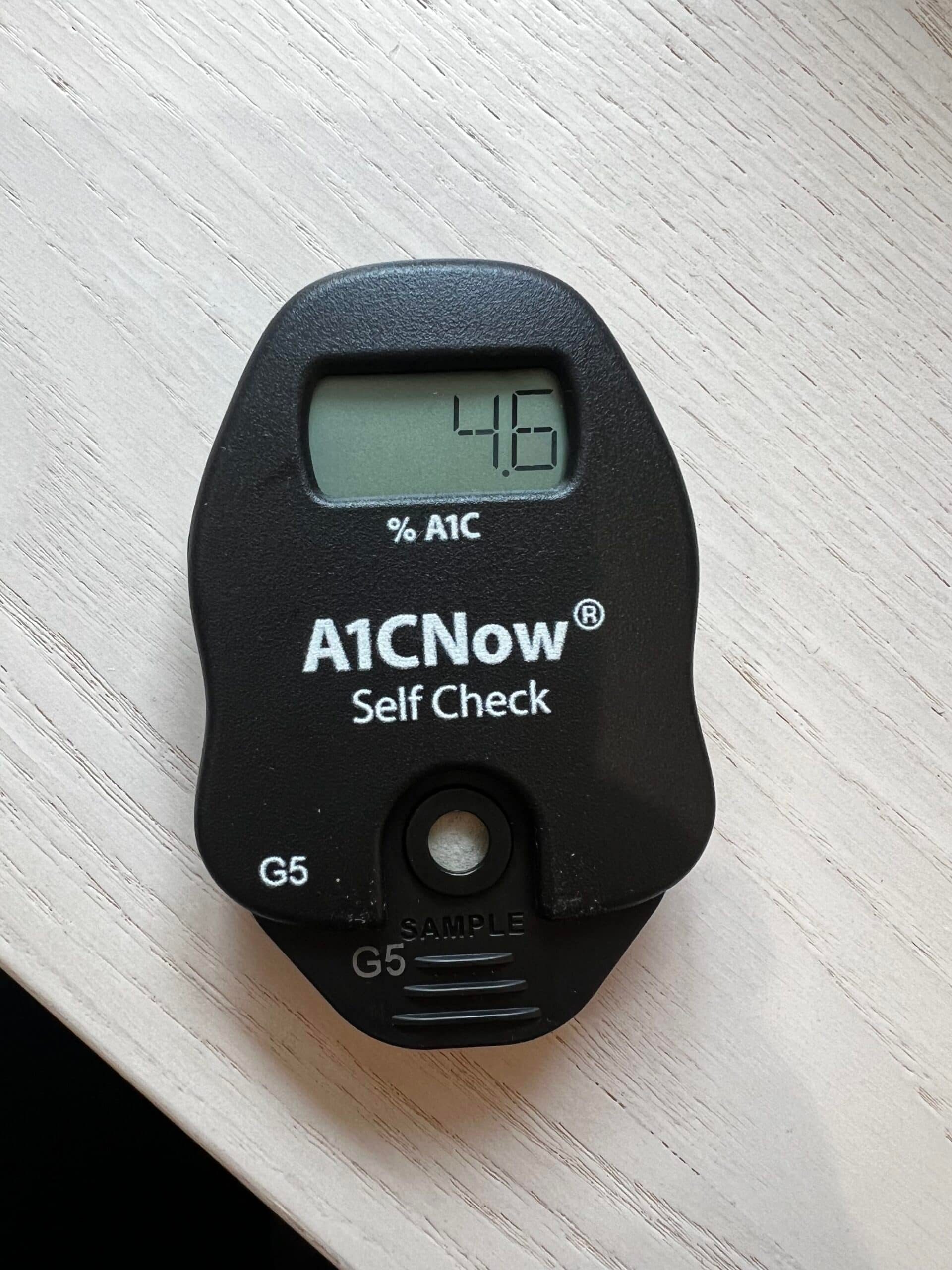
After 15 minutes, the value will disappear, so don’t forget to take your photo! - After you take a photo of your A1C value, discard the following items:
- Both empty pouches,
- The used lancet and lancet cap,
- The used shaker,
- The used cartridge (removed from the analyzer).
Do not discard the analyzer! You will need to use it again in the future.
- Store both of the remaining pouches plus the analyzer in a place where you will be able to find it for the next timepoint of the DYNAMO study.
Watch the video below to follow along step-by-step.
Now, submit your values in the survey
You should have received an email with a link to an online survey.
Follow the link to open the survey. Then, upload the photo you took of the analyzer showing your A1C value, and type the value in to confirm.
Once you submit the survey, you’re done!
Troubleshooting / FAQs
I can’t find my test kit or analyzer.
Reach out to the research team via email at research.support@noom.com to be sent a new test kit.
My test kit is expired (the expiration date listed on a pouch or the analyzer has already passed).
Reach out to the research team via email at research.support@noom.com to be sent a new test kit. Expired test kits cannot be used for the study.
The codes on my analyzer and cartridge do not match.
Contact customer support for the test kit at 1-877-870-5610 (toll-free).
The analyzer is showing an error code.
See the table below for specific help with an error code on the analyzer.
| MESSAGE | DESCRIPTION AND RESOLUTION |
|---|---|
| OR 1 | The blood sample may have too little hemoglobin for the test to work properly, or you added too little blood. Call Customer Service. |
| OR 2 | The blood sample may have too much hemoglobin for the test to work properly, or you added to much blood. Call Customer Service. |
| OR 3 | The blood sample may have too little hemoglobin A1C for the test to work properly, or you added too little blood. Call Customer Service. |
| OR 4 | The blood sample may have too much hemoglobin A1C for the test to work properly, or you added too much blood. Call Customer Service. |
| OR5 | The analyzer temperature is below 64°F (18°C). The test must be repeated with a new cartridge at room temperature 64-77°F (18-25°C). |
| OR 6 | The analyzer temperature is above 77°F (25°C). The test must be repeated with a new cartridge at room temperature 64-77°F (18-25°C). |
| <4.0 | The % A1C is less than 4%. Call Customer Service. |
| >13.0 | The % A1C is greater than 13%. Call your healthcare professional. |
| QC 2 | Occurs when you insert a cartridge that already has sample added to it. Do not remove and reinsert a cartridge after adding sample. |
| 0C6 | Sample was added to cartridge before “SMPL” display. This counts down one test on the analyzer. Remove and discard cartridge. To avoid this error, do not add sample until the “WAIT” prompt clears and “SMPL” appears. |
| QC7 | The cartridge remained in the analyzer without sample addition for 2 minutes after “SMPI” prompt. This counts down one test on the analyzer. Discard the test cartridge and insert a fresh one when you are ready to dispense the shaker. |
| QC 30 to 33 | The analyzer was unable to obtain a valid initial reading. Be sure to remove the shaker within one second after dispensing it into the sample port, and do not disturb the analyzer while the test is running. |
| OC 50 to 51 QC 55 to 56 |
Insufficient sample was delivered to the test cartridge. To avoid this error be sure to fully insert the blood collector into the shaker and shake immediately. |
| All other QC Codes | The quality control checks inside the analyzer did not pass. The test will need to be repeated with another kit. Call Customer Service. |
| E Codes | The analyzer is not working. Call Customer Service. |
Contact customer support at 1-877-870-5610 (toll-free) for additional help with the test.
Table of Contents
For help with something specific, check out these links:
